|
The Details section allows you to select and enter information that will be forwarded to the Lender when sending the Payout Request.
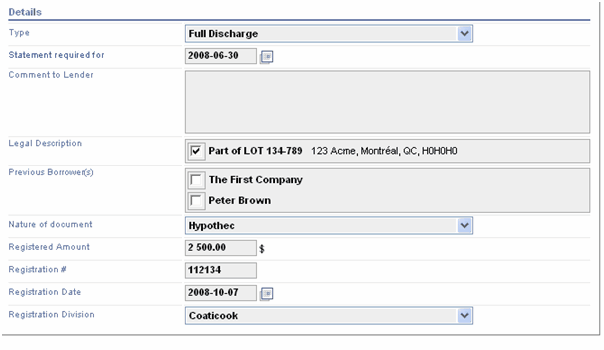
| ■ | Type : this Pull-down menu allows you to select the type of discharge requested, (partial or full Discharge). |
| ■ | Statement required for : this field allows you to enter the date for which the statement is required. |
| ■ | Comment to Lender: this text field allows you to enter additional information that you want to bring to the attention of the Lender when you send the Certified Payout Request. |
| ■ | Legal Description: in this section you can select, using check boxes, the lot corresponding to the property covered by the Payout Request. |
Note: The Legal Description displayed in the window match the information entered in the Legal Description section under the Additional Information tab.
| ■ | Previous Borrower(s) : in this section you can select, using check boxes, the name of the Previous Borrower referred by the Payout Request. |
The Previous Borrower displayed in the window match the information entered in the First / Last Name or Company Name (case of company) in the Current Registered Owner(s) section under Additional Information tab.
Note: You must select at least 1 Previous Borrower in order to submit a Request for Payout Statement to the Lender.
| ■ | Nature of Document : this pull-down menu allows you to select the nature of discharge requested (ex: hypothec, subrogation, etc.). |
| ■ | Registered Amount : this field allows you to enter the amount of the guaranty as written on the Discharge document. |
| ■ | Registration #: this field allows you to indicate the Discharge Registration number. |
| ■ | Registration Date: this field allows you to indicate the Discharge Registration date. |
| ■ | Registration Division: this pull-down menu allows you to select the Registration Division where the Discharge was registered. |
|


